Build and Manage Your Own
Live-Streaming Agency on
Vone Live
Vone App Live. We give you the support and guidance you need. Your job is simple: build a team of creators, manage them, and grow your independent business.
About US
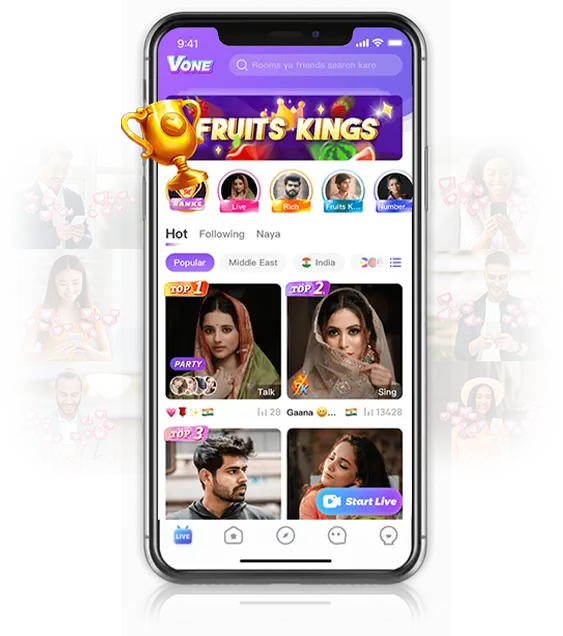
Vone Application is designed for users to promote their talent at a global level.
Potential users showcase their skills to the audience through live streaming,
interacting with them, and building connections.
The application provides the opportunity to
convert your passion into a profitable career.
How to Create Agency in Vone - Become Vone Agent
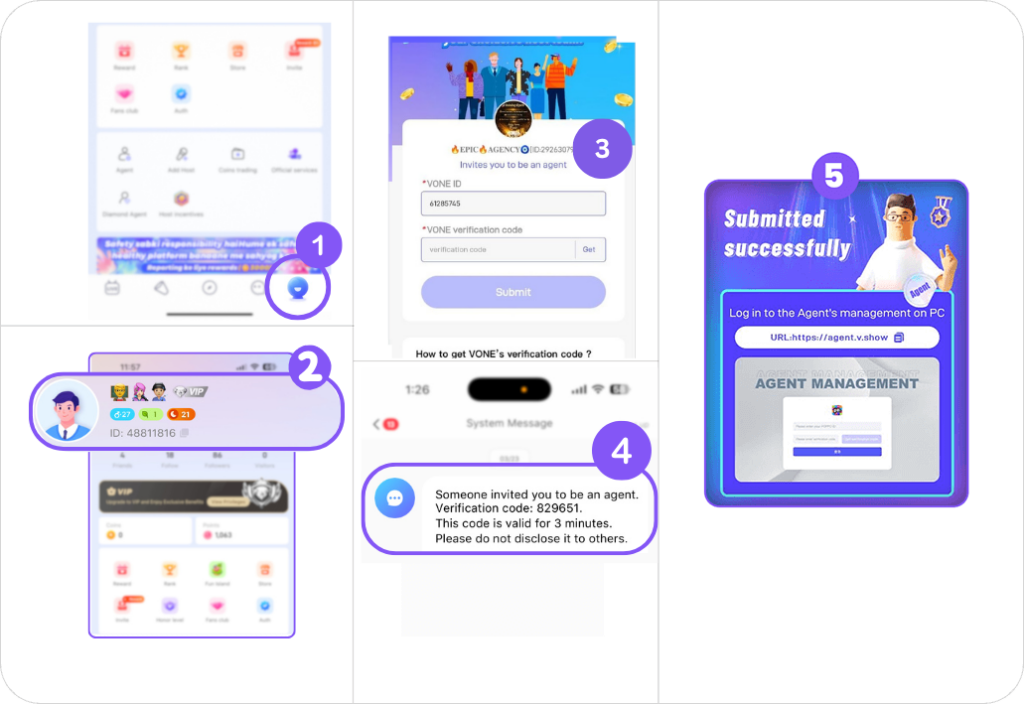
1. Download Vone Live.
2. Create an Account on Vone Live App
3. Copy Your Vone ID from the profile.
4. Click on the
Agency Registration Link .
5. Enter Vone ID & Click “Get”.
6. Find the verification
code in Vone messages
7. Enter the Verification Code & submit.
Inform us on WhatsApp at +917665229617 after
completing the process.
2. Create an Account on Vone Live App
3. Copy Your Vone ID from the profile.
4. Click on the Agency Registration Link .
5. Enter Vone ID & Click “Get”.
6. Find the verification code in Vone messages
7. Enter the Verification Code & submit.
Inform us on WhatsApp at +917665229617 after completing the process.
Vone Host Registration
Method 1
Host Registration with Agent ID
1. Download the Vone App
2. Install & Register on Vone App
3. The host must click on ‘My Agency’ from the profile options.
4. Enter Agent ID ‘29263079’ & Apply to join the agency.
5. You will see Agency name EPIC AGENCY
Inform us on WhatsApp at +917665229617 after completing the process.
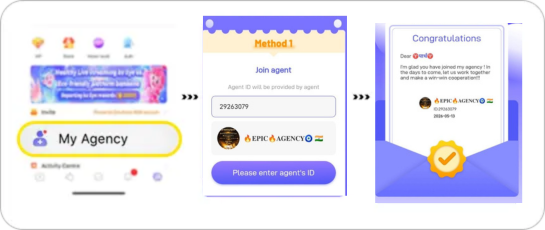
Method 1 Host Registration with Agent ID
1. Download the Vone App
2. Install & Register on Vone App
3. The host must click on ‘My Agency’ from the profile options.
4. Enter Agent ID ‘29263079’ & Apply to join the agency.
5. You will see Agency name EPIC AGENCY
Inform us on WhatsApp at +917665229617 after completing the process.
2. Install & Register on Vone App
3. The host must click on ‘My Agency’ from the profile options.
4. Enter Agent ID ‘29263079’ & Apply to join the agency.
5. You will see Agency name EPIC AGENCY
Inform us on WhatsApp at +917665229617 after completing the process.

Method 2
Become a Host through an Invitation
1. Download the Vone App
2. Install & Register on Vone App
3. Find the Vone ID & Host Code
(To check ID & Host code, click on the ‘My Agency’ option in the profile and check Method 2)
4. Send us your Vone ID & Host Code on WhatsApp at +917665229617
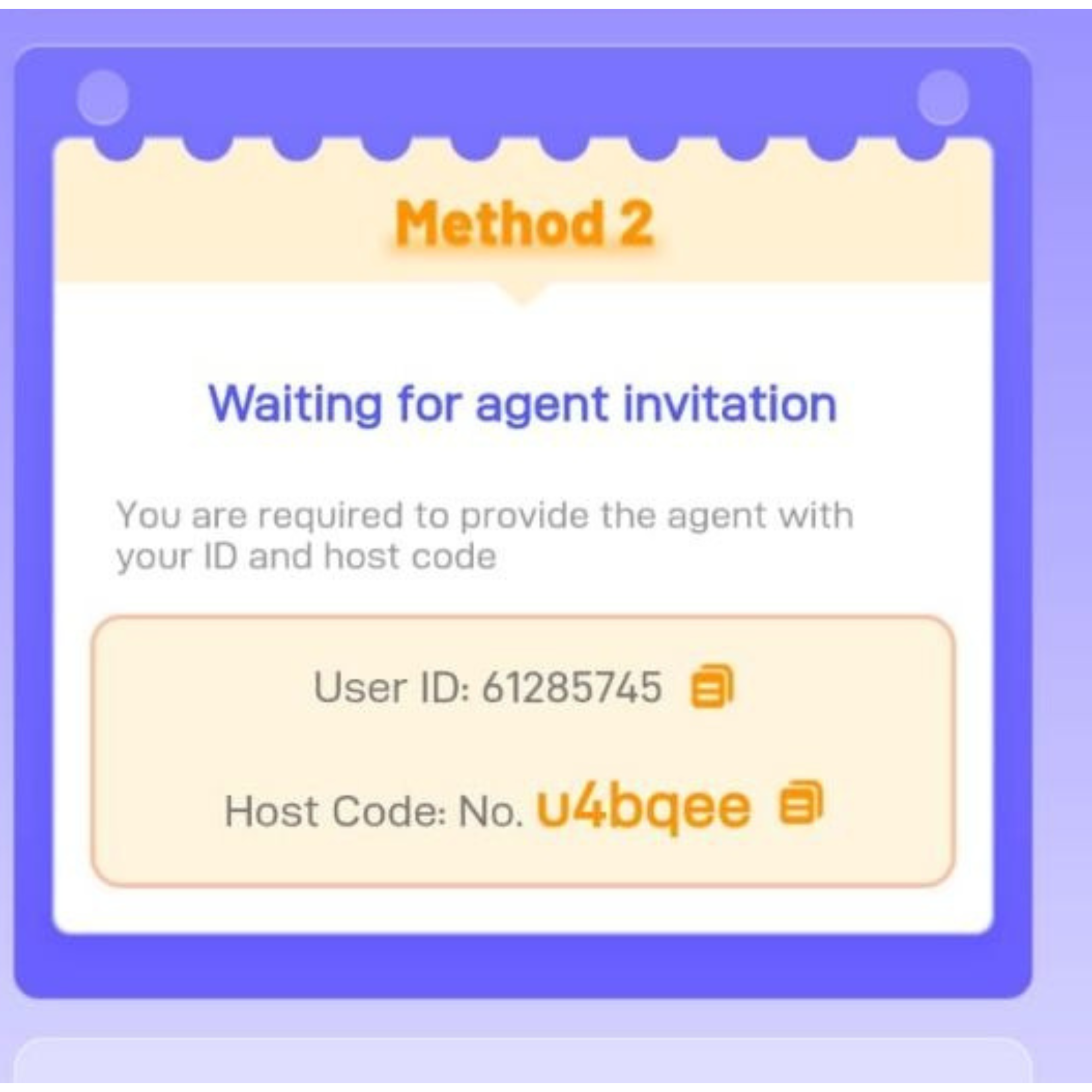
2. Install & Register on Vone App
3. Find the Vone ID & Host Code (To check ID & Host code, click on the ‘My Agency’ option in the profile and check Method 2)
4. Send us your Vone ID & Host Code on WhatsApp at +917665229617
Vone Host Earnings
Vone Host earns through the virtual gifts sent by the audience to appreciate their talent. The host gets a 70% share of the total received gifts and these gifts can be easily converted into real money.
- Example: If a host gets a gift worth 10000 coins, she will earn 7,000 coins as a 70% share.
- Points Value:
10000 Points = $1
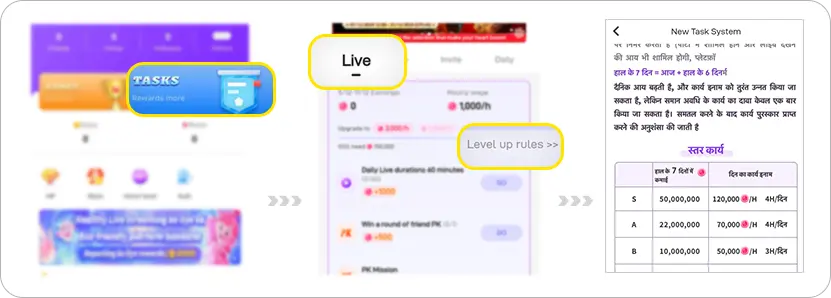
- Make sure to check out the Task and Level-up section in your profile for additional earnings.
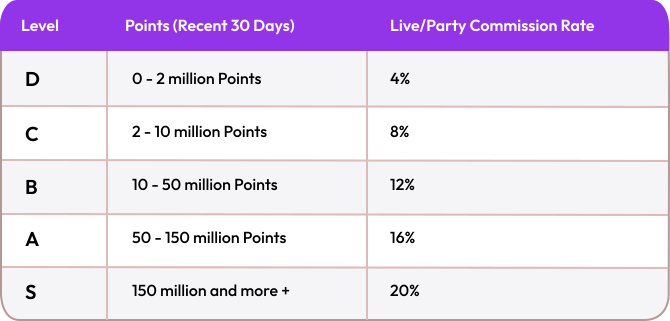
Vone Agency Commission Structure
Vone Host earns through the virtual gifts sent by the audience to appreciate their talent. The host gets a 70% share of the total received gifts and these gifts can be easily converted into real money.
- The conversion value is 10000 Points = $1.
-
The last 30 days' commission is calculated based on this formula:
Hosts' earnings * commission rate + (agent's commission rate - sub agent's commission rate) * subagent's earnings.
-
The monthly commission rate varies between 4% to 20%
Invite Host and Agents Under Your Agency
1. Follow the below steps to invite a Vone host
- Open the agency account, Click on the Profile section >> Agent.
- The agency will click “Add Host” in the profile section.
- Enter the User ID and Host Code and click “Send Invitation”.
- The host will receive the invitation message in-app messages.
2. Follow the below steps to invite a Vone Agents
- Open the agency’s account, Go to My Profile>> Agent>>Manage>>Invite Agent.
- Click “Copy” on the provided invitation link and share it with the agent.
- The agent will open the shared link, enter the Vone ID, and click “Get” for the verification code.
- Copy the verification code from the Vone app message and “Submit”.
Vone App
Withdrawal Process
How to withdraw money
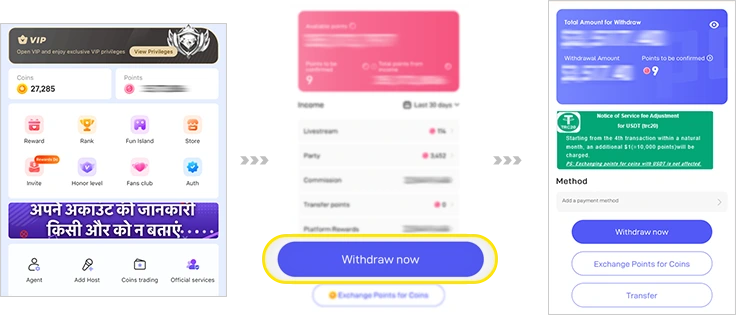
- Open the agency account and Click on “Points”.
- Click on “Withdraw Now” and select your preferred method and country.
- Enter your Security password to withdraw the money.
Rules to Remember
- 10,000 Points = $1
- The minimum amount for the withdrawal is $10 or in the multiple of 10.
- The balance amount will be stored and can be withdrawn later.
- Every payment method will have a service charge, choose as per your preference.
- The most used methods are E-pay, Paypal, Payoneer, bank transfer, etc.
Benefits
of Vone
Live
Agency
Get Commission
Earn income based on the total earnings of the streamers and agents and get a commission b/w 4% to 20%.
Hire Globally
Onboard the talented streamers and agents to join the Vone App globally.
Self Withdrawal
An easy two-step self-withdrawal process for all agents and hosts.
24*7 Support
Have any queries? Feel free to contact our team at any time.
Vone Rules & Regulations
- Third-party promotion is not allowed.
- A host can join only one agency at a time, any new ID created will be banned.
- Everyone in your team must be at least 18 years old and verify their identity.
- No adult content, hate speech, or breaking the law. We have a zero-tolerance policy.
- As an agency owner, it is your job to make sure your team follows the rules.
- You need to stay active and recruit at least 10 active creators on your team.
- Keep your passwords and account details safe.